Showing posts with label pattern. Show all posts
Showing posts with label pattern. Show all posts
How to peg your pipeline to a dependency version
http://www.thoughtworks-studios.com/blog/how-peg-your-pipeline-dependency-version
How to peg your pipeline to a dependency version...modeling static and fluid dependencies in Go.
How to peg your pipeline to a dependency version...modeling static and fluid dependencies in Go.
One task per job
I care for the ability to keep my build and deploy config under version control (just like application source code and config). I also care for the ability to run my builds and deployments outside of Go if needed. Turns out this is pretty straightforward to achieve with Go because Go simply execs its tasks, even in case of first-class support (except for fetch-artifact). As an aside, this is actually one reason why even task-plugins should not be more than exec - get too close and you lose independence.
One useful step along the way is to make sure I don’t inline my build and deployment commands within Go. So each task should just be a script invocation to an externally version controlled script. For example if we use a tool like ant, maven, nant or rake, pretty much every task can be of the form: tool <target> that runs off a version controlled build file.
In general, a job with N tasks can be refactored to a single-task-job that invokes a version controlled script containing N lines. There is one small hitch though. In Go, a job is the unit of work on the agent. A job can have many tasks, they will be executed in sequence on the same agent. If any task exits with non-zero, the job is failed and subsequent tasks are not executed (except for cancel and fail handlers). This is useful fail-fast behaviour.
However, we lose this behaviour when we move from N tasks to a single-script-task because by default, a bash script or windows batch script will not stop execution if any of its lines returns non-zero. This can be easily fixed in bash with the set -e command (thanks Arvind). Combine this with the -x option to get even better logging on the Go Job Console!
#!/bin/bash
set -e -x
# rest of the script
There are ways to do this on Windows, please see this discussion on stackoverflow.
One useful step along the way is to make sure I don’t inline my build and deployment commands within Go. So each task should just be a script invocation to an externally version controlled script. For example if we use a tool like ant, maven, nant or rake, pretty much every task can be of the form: tool <target> that runs off a version controlled build file.
In general, a job with N tasks can be refactored to a single-task-job that invokes a version controlled script containing N lines. There is one small hitch though. In Go, a job is the unit of work on the agent. A job can have many tasks, they will be executed in sequence on the same agent. If any task exits with non-zero, the job is failed and subsequent tasks are not executed (except for cancel and fail handlers). This is useful fail-fast behaviour.
However, we lose this behaviour when we move from N tasks to a single-script-task because by default, a bash script or windows batch script will not stop execution if any of its lines returns non-zero. This can be easily fixed in bash with the set -e command (thanks Arvind). Combine this with the -x option to get even better logging on the Go Job Console!
#!/bin/bash
set -e -x
# rest of the script
There are ways to do this on Windows, please see this discussion on stackoverflow.
Pipelines and Value Streams
A Go Pipeline does not necessarily map one-to-one with what is referred to as the automated deployment pipeline in continuous delivery litreature. The automated deployment pipeline is essentially the end-to-end CD value stream. This end to end value stream is often better modeled using multiple Go Pipelines.
For very simple cases, it may be enough to model the entire value stream inside a single Go Pipeline as the diagram in the documentation suggests.
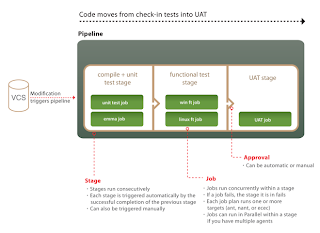 But for any realistic case, we are going to have to integrate the output of multiple teams and then subject the combined package to integration testing etc. In this case, it is much more flexible to model the value stream with multiple pipelines as below (each box is a pipeline).

There is no need to stop at one pipeline per team. If anything, the pipeline group is useful as a team level concept. Modeling your delivery value stream using multiple pipelines allows you to:

For very simple cases, it may be enough to model the entire value stream inside a single Go Pipeline as the diagram in the documentation suggests.


There is no need to stop at one pipeline per team. If anything, the pipeline group is useful as a team level concept. Modeling your delivery value stream using multiple pipelines allows you to:
- Associate different materials with different pipelines
- Associate different pipelines with different environments.
- Pause or lock a specific pipeline without affecting the other pipelines.

Traceability with upstream pipeline labeling
You can get good traceability for your builds by using Go's custom pipeline labels effectively.

In the above diagram, each box represents a pipeline. This is a situation where there are three teams whose work needs to be integrated under the umbrella of a project X. Each box has three lines of text with the following convention.
Line 1 is the name of the pipeline
Line 2 is the custom pipeline label spec (see diag below for how to specify)
Line 3 is the resulting pipeline label after a certain run of the pipeline

So the general technique here is to simply use the upstream label for downstream pipelines with just one upstream dependency. For pipelines with multiple upstream dependencies (e.g. project-X-integration), you could use a combination of upstream labels and new prefixes.
In the above diagram, each box represents a pipeline. This is a situation where there are three teams whose work needs to be integrated under the umbrella of a project X. Each box has three lines of text with the following convention.
Line 1 is the name of the pipeline
Line 2 is the custom pipeline label spec (see diag below for how to specify)
Line 3 is the resulting pipeline label after a certain run of the pipeline

So the general technique here is to simply use the upstream label for downstream pipelines with just one upstream dependency. For pipelines with multiple upstream dependencies (e.g. project-X-integration), you could use a combination of upstream labels and new prefixes.
Modeling higher order workflows with Go
How do you use Go to address the following situation?
Say your QAs do some manual exploratory testing in addition
to all the automation. They might want to have the last good build
automatically deployed to their test environment for them every morning so that they don’t have to spend time manually figuring out the last good build and
deploying it.
 |
| Manual Stage Type |
Simply creating a downstream deployment pipeline won’t do the
trick. For one, it would auto-schedule for every successful upstream build thus
wiping out the previous deployment and any testing in progress. To prevent auto-scheduling, you need to mark the first stage of the downstream pipeline as type manual.

 So far so good. Our deploy pipeline will now only schedule at 10:15am every day. But sometimes, the QAs want to continue testing a given build the next day. They don't want the next day's timer trigger to deploy a new build. One way to do this is to manually pause the pipeline. This will prevent the pipeline from scheduling until unpaused.
 |
| A locked pipeline |

Finally, we need to consider the agents where stuff gets deployed. It is important to ring-fence the agents by defining an QA-exploratory-testing environment. It is also necessary to instruct all deployment jobs to run on all agents.


Hopefully this illustrates the power of combining a number of Go-primitives to achieve higher order behaviour.
Subscribe to:
Posts (Atom)